
If you are currently building or testing Salesforce Agentforce, you’ve probably asked yourself a question: Which Large Language Model (LLM) is actually running under the hood of my autonomous agent right now?
When you open the standard Agent Builder view, you don’t get a simple “model choice” dropdown menu by default. Because Salesforce routes everything through the secure Einstein Trust Layer, the platform enforces model configurations globally across the organization.
If you are trying to audit your setup, optimize response accuracy, or troubleshoot a weird hallucination, you need a clear way to see exactly what model is executing. After digging into the metadata and back-end settings, I found the exact steps to pinpoint your LLM. Here is how you can do it in three quick steps.
Step 1: Check the Global Org-Wide Model Configuration
Unless someone applied an intentional override, all of your Agentforce agents inherit a single default model set at the organization level. To find your org’s default provider, follow this path:
- Log into your Salesforce org and click the Gear Icon in the top right corner to open Setup.
- In the Quick Find box on the left, search for and select Einstein Audit, Analytics, and Monitoring Setup.
- Scroll down until you see the section labeled Select the model option for Agentforce.
- Look at which provider option is checked active. It will fall into one of three standard buckets:
- Salesforce Default: A dynamically managed mix of enterprise-grade models optimized by Salesforce (predominantly relying on OpenAI’s GPT-4o architecture).
- Agents created in the new Agentforce Builder use GPT-4.1
- Agents created in the legacy Agentforce Builder use GPT-4o
- AWS Hosted: Your agent’s reasoning cycles are routed natively to Anthropic’s Claude models hosted on Amazon Bedrock.
- Gemini: Your agent’s reasoning cycles are routed to Google’s Gemini Flash models.
- Salesforce Default: A dynamically managed mix of enterprise-grade models optimized by Salesforce (predominantly relying on OpenAI’s GPT-4o architecture).

Step 2: Check for Subagent Model Overrides
What if you have one specific subagent or topic that needs a more advanced reasoning model than the rest of your org? Salesforce allows you to bypass the global defaults. To check if a specific agent has a unique model assigned, look at the workspace:
- Go to Setup and search for Agentforce Agents.
- Select and open your agent to launch the Agentforce Builder workspace.
- Select a specific Subagent or Topic from your configuration panel on the left.
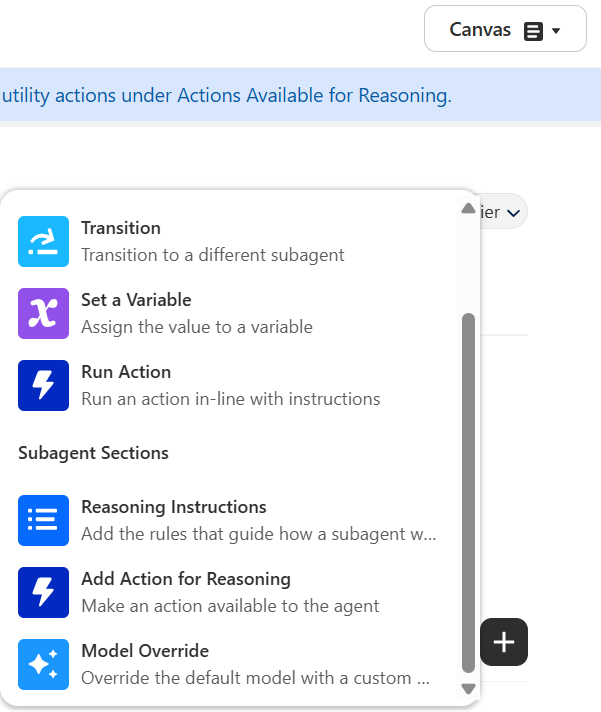
- Look directly at the upper-right configuration pane or click the
+icon to check if a Model Override is active. - If an override has been configured, the exact model name (like a specific version of Anthropic Claude or a custom Bring Your Own LLM connector) will be explicitly selected in that view.
Step 3: Inspect via Developer Agent Scripts (For Admins & Devs)
If you prefer verifying configurations via code rather than clicking through the UI—or if you are checking things before a metadata deployment—you can check the raw agent scripts:
- Open your agent’s underlying Agent Script configuration file.
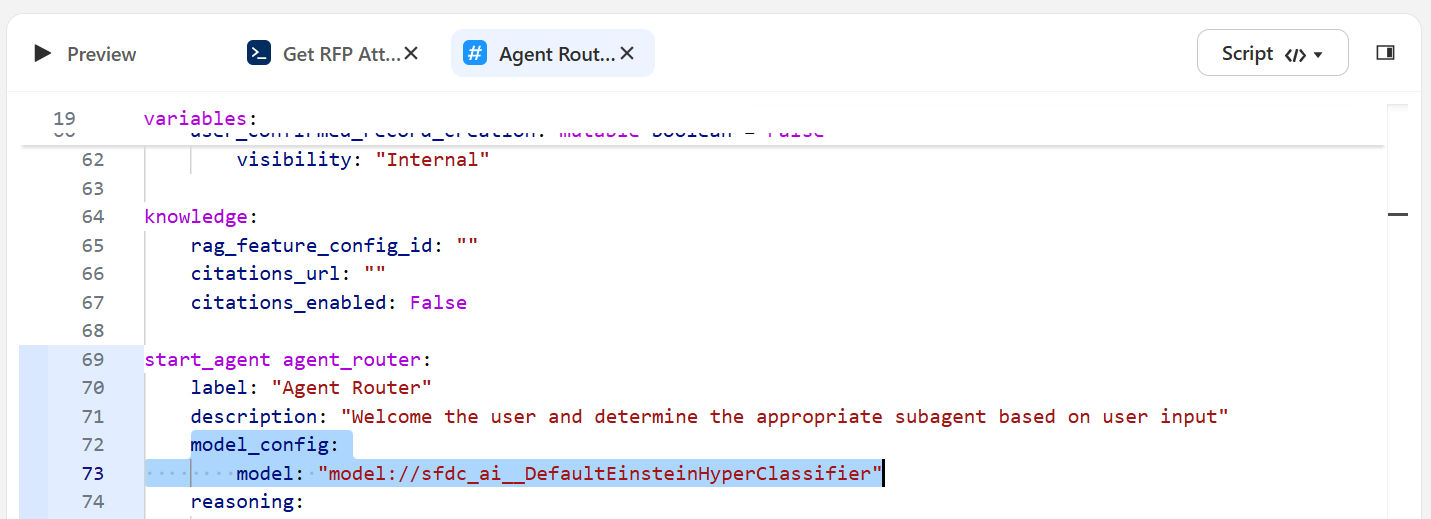
- Locate the
model_configblock within the metadata parameters. - Look for the explicit model string. For example, if you see code containing
model: "model://sfdc_ai__DefaultBedrockAnthropicClaude45Sonnet", your agent is running that explicit model variant regardless of what your global setup page says.
Frequently Asked Questions About Agentforce Models
Can you change the LLM model for a single Prompt Template?
Yes. While Agentforce agents default to a single global setting for the entire org, you can select completely different custom models for individual Prompt Templates within Salesforce Prompt Builder.
How can I watch an agent call the model in real time?
Open a preview session inside the Agent Builder and turn on the built-in Agent Tracer tool. The tracer allows you to inspect the raw JSON payloads of live conversations, giving you a transparent look at the exact model call and reasoning paths the Atlas Reasoning Engine takes.
Note: The post content is slightly revised by AI.

